
Clear pending NCOALink files after service interruption
If the NCOALink process is down for a period of time while you're attempting NCOALink processing, then at the time NCOALink resumes, you may need to clear pending files in order for NCOALink to process your files again. Follow these step-by-step instructions to get NCOALink working again:
- Exit the AccuZIP6 program.
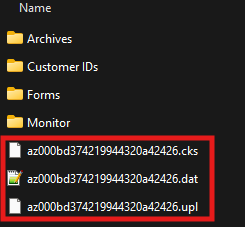
- Browse to C:\Program Files (x86)\AccuZIP6 5.0\iNcoalink\
- In that folder, you'll see some folders and some files. Delete the loose files. Do not touch the Archives, Customer IDs, Forms or Monitor folders.
- Launch AccuZIP6 run address validation again.